
Appearance
My list and exclusions Pathway graph
When you select nodes within the Pathway graph, they are listed by their identifiers (ID) in the Selected nodes section. This list serves as a central point for managing these nodes with one of following functions.
Selected nodes
Here you can see which nodes you have selected. The identifier used is determined by your choice in Select Identifier. Once selected, you can pin these nodes to a list of interest (My List) or exclude them. Below is an explanation of both options:
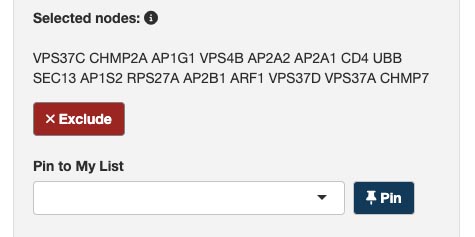
Pin to My List
The 📌 Pin button enables you to add selected nodes to your chosen list (My lists) from Pin to My List, providing a convenient way to save and organize nodes of interest.
💡 Learn how to create a My lists.
Exclusion
To refine your analysis, the Exclude function enables you to remove selected nodes from consideration. This can help in focusing your analysis on the most relevant nodes by excluding those that do not contribute to the current research inquiry or it can be used to remove connection facilitated by the excluded and get Omics Studio to identify alternatives using the Shotest path (external) function.
How to reinstate the exluded nodes?
⚠️ The current platform version does not support reinstating individual nodes.
If you have excluded nodes from your analysis and wish to reintegrate them, please note that the current platform version does not support reinstating the nodes. To include excluded nodes in your analysis again, use the Reset button. This action will clear all exclusions, allowing you to start afresh and select nodes as needed.
By using these functionalities, you can efficiently manage your selected nodes, enhancing the precision and relevance of your pathway analysis.